Build products on a shared operating framework.
Build once. Ship across domains.
After Framework gives products a shared foundation: architecture, identity, AI, design systems, tooling, and reusable domain modules.
01 · Framework architecture
One kernel. Two product lines. Thin products on top.
Every product shares the same layers. Adding a Life Domain or Industry Domain adds a module at the top — the layers below do not change.
Product-specific
Shared platform
Composition-root adapters
Select a layer to see what it owns and what it depends on.
after_core
Shared kernel
Auth, hardened networking, storage, Riverpod DI, flags, remote config, BYOK AI SDK, premium entitlements, notifications, deep links, and the dashboard, plugin, search and settings engines.
- Depends on
- None — base layer
- Used by
- Product domain layer · Ecosystem layer · AI capabilities · Consumer modules · Enterprise modules · Design system · Firebase adapters
Shared reuse, product-specific experience
The platform doctrine targets ninety percent or more of runtime capability inherited per product. A product owns its domain, vertical features, AI profile, catalogs and branding — nothing else.
Rules that keep the system standing
- 01Ports over SDKs: vertical code depends on After interfaces, never on vendor SDKs.
- 02Vertical modules live only in product repos under lib/features/.
- 03Every port ships with a mock, so scaffolds run without a backend.
- 04Generate, don't greenfield: new products start from a spec, not a new architecture.
02 · Product factory
From idea to working product on a reusable foundation.
The product factory turns a small product.spec.yaml into a sibling Flutter app that depends on the shared packages. The spec holds only what is unique to the product.
- 01
Idea
Name the product and pick a line: consumer or enterprise, with SuperGarage or SuperHospital as the reference.
- 02
Domain
Write product.spec.yaml: domain, vertical features, tabs, permissions, dashboard widgets, AI skills, branding, locales.
- 03
Modules
Everything not in the spec — auth, membership or org, RBAC, calendar, tasks, notifications, search — is inherited.
- 04
Product shell
generate_product.ps1 emits the manifest, composition root, feature catalog, shell, l10n files and a CI workflow.
- 05
Deployment
The generated CI workflow runs format, analyze and tests with coverage on every push and pull request to main.
The product owns
- Name, package, bundle, product line
- Vertical features and i18n keys
- Navigation tabs
- RBAC permission strings
- Dashboard widgets
- AI skills and tool bindings
- Accent color and monogram
The platform provides
- Auth and superadmin
- Membership or organization
- RBAC engine and audit log
- Calendar, tasks, documents
- Notifications and analytics
- Workflow, dashboard and search engines
- Design system, splash, CI
Re-running the generator with an evolved spec updates skeleton files without destroying human-authored feature code.
03 · Packages and capabilities
Seven packages. Explicit dependencies.
All packages are version 1.0.0 in the supercore repository and are consumed through path dependencies. Select a package to trace what it depends on and what depends on it.
Shared kernel
after_core
Ports and default implementations for auth, networking, storage, DI, analytics, feature flags, remote config, AI, notifications, deep links and premium entitlements. Products override Riverpod providers with their own adapters.
- Depends on
- None — base layer
- Used by
Key APIs
- AppPlatformManifest
- PlatformConfig
- AfterStandardOverrides
- AfterBootstrapMode
- AfterAuthRepository
- AfterApiClient
- AfterHttpClientFactory
- AfterFeatureFlags
- AfterRemoteConfig
- AfterAiCredentialVault
Notable third-party dependencies
flutter_riverpod · dio · flutter_secure_storage · shared_preferences · google_sign_in · app_links · flutter_local_notifications
Example
import 'package:after_core/after_core.dart';
import 'package:flutter_riverpod/flutter_riverpod.dart';
import 'package:shared_preferences/shared_preferences.dart';

Future<void> main() async {
  WidgetsFlutterBinding.ensureInitialized();
  final prefs = await SharedPreferences.getInstance();

  runApp(
    ProviderScope(
      overrides: [
        afterSharedPreferencesProvider.overrideWithValue(prefs),
        afterAuthRepositoryProvider.overrideWithValue(MyFirebaseAuthRepository()),
        afterAnalyticsProvider.overrideWithValue(MyFirebaseAnalytics()),
        // ... store-specific adapters
      ],
      child: const MySuperApp(),
    ),
  );
}
Source supercore/packages/after_core/README.md (opens in a new tab)
Ecosystem fabric
after_ecosystem
After ID, After+, the event bus, cross-product APIs, shared services and ecosystem AI context, so consumer and enterprise modules behave like one system.
- Depends on
- Used by
Key APIs
- AfterEventBus
- AfterProductApi
- AfterProductApiRegistry
- AfterSecureInteropBridge
- AfterEcosystemAiContext
- afterEcosystemProvider
Notable third-party dependencies
flutter_riverpod · uuid
Example
{
  "id": "evt_…",
  "type": "garage.maintenance.completed",
  "sourceProductId": "super_garage",
  "afterId": "aid_…",
  "organizationId": null,
  "occurredAt": "2026-07-19T20:00:00Z",
  "correlationId": "corr_…",
  "payload": { }
}
Source supercore/docs/AFTER_ECOSYSTEM_PLATFORM.md (opens in a new tab)
AI capability platform
after_ai
A modular AI layer: products select an AfterAiProfile that enables capabilities. Calling a disabled capability throws. Every capability ships with a mock adapter.
- Depends on
- Used by
- No package depends on it
Key APIs
- AfterAiPlatform
- AfterAiProfile
- AfterAiCapability
- AfterAiCapabilityDisabledException
- afterAiProfileProvider
- afterAiPlatformProvider
- AfterToolCallingAi
- AfterAiPluginRegistry
Notable third-party dependencies
flutter_riverpod · uuid
Example
// after_framework.dart
afterAiProfileProvider.overrideWithValue(AfterAiProfile.superGarage),

// feature code
final ai = ref.watch(afterAiPlatformProvider);
if (ai.canChat) {
  final reply = await ai.chat(message: input);
}
Source supercore/packages/after_ai/README.md (opens in a new tab)
Design system
after_design_system
The shared visual language: color, spacing, radius, motion and typography tokens, Material 3 theme data and shared components, identical across product lines.
- Depends on
- Used by
Key APIs
- AfterThemeData
- AfterTheme
- AfterColors
- AfterSpacing
- AfterRadius
- AfterMotion
- AfterFadeSlide
Notable third-party dependencies
shared_preferences
Example
abstract final class AfterThemeData {
  static ThemeData light({
    AfterTypography typography = AfterTypography.garage,
    Color? accentOverride,
  }) { … }

  static ThemeData dark({
    AfterTypography typography = AfterTypography.garage,
    Color? accentOverride,
  }) { … }
}

// Product: same family, own accent (spec branding.accent).
MaterialApp(
  theme: AfterThemeData.light(accentOverride: const Color(0xFF22D3EE)),
  darkTheme: AfterThemeData.dark(accentOverride: const Color(0xFF22D3EE)),
);
Source supercore/packages/after_design_system/lib/src/foundations/theme.dart (opens in a new tab)
Consumer modules
after_consumer
A deliberately thin B2C layer on top of the kernel: membership, consumer feature catalog, personal vault, launch consent, regional location and family shell chrome.
- Depends on
- Used by
- No package depends on it
Key APIs
- ConsumerMembership
- ConsumerCoreFeatureId
- ConsumerVerticalFeature
- PersonalVaultRepository
- consumerMembershipProvider
- personalVaultRepositoryProvider
Notable third-party dependencies
flutter_riverpod · geolocator · geocoding · image_picker · permission_handler
Example
dependencies:
  after_core:
    path: ../supercore/packages/after_core
  after_consumer:
    path: ../supercore/packages/after_consumer
  after_design_system:
path: ../supercore/packages/after_design_systemEnterprise modules
after_enterprise
Fourteen shared B2B ports with deterministic in-memory mocks, fail-closed tenancy through EnterpriseScope, and a product runtime and shell host.
- Depends on
- Used by
- No package depends on it
Key APIs
- EnterpriseScope
- OrganizationRepository
- RbacRepository
- PermissionSet
- WorkflowEngine
- TaskRepository
- CalendarRepository
- DocumentRepository
- EnterpriseAiAssistant
- AuditLogRepository
Notable third-party dependencies
flutter_riverpod · collection · uuid
Example
static Future<List<Override>> ensureConfigured({
  EnterpriseRepository? enterpriseRepository,
}) async {
  PlatformConfig.current = superAppEnterpriseManifest;
  final prefs = await SharedPreferences.getInstance();
  return [
    ...AfterStandardOverrides.create(
      preferences: prefs,
      userAgent: '${superAppEnterpriseManifest.appName}/'
          '${superAppEnterpriseManifest.appId}',
    ),
    enterpriseRepositoryProvider.overrideWithValue(
      enterpriseRepository ?? MockEnterpriseRepository(),
    ),
  ];
}
Source supercore/templates/super_app_enterprise/after_framework.dart (opens in a new tab)
Firebase adapters
after_firebase
Firebase Auth, Firestore blob and Storage media adapters for the composition root. If Firebase is not configured or fails to start, it falls back to local adapters instead of crashing.
- Depends on
- Used by
Key APIs
- AfterFirebaseBootstrap
- FirebaseAfterAuthRepository
- FirestoreAfterUserBlobSync
- FirebaseAfterUserMediaSync
- AfterFirebaseCloudAvailability
Notable third-party dependencies
firebase_core · firebase_auth · cloud_firestore · firebase_storage · google_sign_in
Example
// Cold start, before ProviderScope. Returns false (no crash) when
// options are null or init fails — auth falls back to prefs adapters.
await AfterFirebaseBootstrap.ensureInitialized(options: firebaseOptions);

final overrides = [
  ...AfterStandardOverrides.create(
    preferences: prefs,
    userAgent: userAgent,
    includeUserBlobSync: false, // Firebase provides blob sync below
  ),
  ...AfterFirebaseBootstrap.overrides(
    preferences: prefs,
    appId: 'super_garage',
  ),
];
Source supercore/packages/after_firebase/lib/src/after_firebase_bootstrap.dart (opens in a new tab)
04 · CLI and developer workflow
Scripts and Flutter commands, not magic.
Tooling lives in supercore/scripts as PowerShell scripts, alongside the standard Flutter toolchain. There is no separate packaged CLI binary.
Initialize
Validate a spec without Flutter, then generate the sibling app and bootstrap it.
powershell -File scripts\validate_product_spec.ps1 -SpecPath factory\specs\examples\super_airport.product.spec.yaml# From a spec
powershell -File scripts\generate_product.ps1 -SpecPath factory\specs\examples\super_airport.product.spec.yaml
# From a name only (quick starter)
powershell -File scripts\generate_product.ps1 -Name SuperAirport -Reference SuperHospital
# Preview without writing files
powershell -File scripts\generate_product.ps1 -SpecPath factory\specs\examples\super_airport.product.spec.yaml -DryRuncd ..\superairport
flutter create .
flutter pub get
flutter analyze
flutter testCompose packages
Depend on the kernel, one product-line layer and the design system through path dependencies.
dependencies:
  after_core:
    path: ../supercore/packages/after_core
  after_consumer:
    path: ../supercore/packages/after_consumer
  after_design_system:
path: ../supercore/packages/after_design_systemdependencies:
after_core:
path: ../supercore/packages/after_core
after_enterprise:
path: ../supercore/packages/after_enterprise
after_design_system:
path: ../supercore/packages/after_design_systemConfigure
Declare identity in AppPlatformManifest. Scaffold mode allows mocks; production mode fails at startup when an adapter is missing.
const superHospitalManifest = AppPlatformManifest(
  appName: 'SuperHospital',
  appId: 'super_hospital',
  packageName: 'com.overstein.superhospital',
  androidWidgetProvider: 'com.overstein.superhospital.WidgetProvider',
  iosAppGroupId: 'group.com.overstein.superhospital',
  productLine: AfterProductLine.enterprise,
);
Source supercore/docs/AFTER_OS_ARCHITECTURE.md (opens in a new tab)
/// Composition safety mode (ADR-007).
///
/// - [scaffold]: in-memory / mock adapters are allowed (templates, tests).
/// - [production]: missing real adapters must throw at startup.
enum AfterBootstrapMode {
  scaffold,
  production,
}
Source supercore/packages/after_core/lib/src/bootstrap/after_bootstrap_mode.dart (opens in a new tab)
Test
Format, analyze and test with coverage, then check the product against the platform reuse contract.
dart format --output=none --set-exit-if-changed .
flutter analyze
flutter test --coverage

# Platform doctrine check against a generated product
powershell -File scripts\check_reuse_contract.ps1 -AppRoot ..\superairport
Source supercore/scripts/generate_product.ps1 · docs/PLATFORM_DOCTRINE.md (opens in a new tab)
Deploy
Generated products ship with an analyze-and-test GitHub Actions workflow. Android release signing is wired by a supercore script.
name: analyze-and-test
on:
  push:
    branches: [ main ]
  pull_request:
    branches: [ main ]
jobs:
  analyze-and-test:
    runs-on: ubuntu-latest
    steps:
      - uses: actions/checkout@v5
      - name: Checkout supercore (sibling)
        uses: actions/checkout@v5
        with:
          repository: oversteintech/supercore
          path: ../supercore
      - uses: subosito/flutter-action@v2
        with:
          channel: stable
      - run: dart format --output=none --set-exit-if-changed .
      - run: flutter pub get
      - run: flutter analyze
      - run: flutter test --coverage
Source supercore/scripts/generate_product.ps1 (.github/workflows/ci.yml) (opens in a new tab)
# Wires Play release signing for sibling apps; -BuildAab also builds bundles.
# key.properties / *.jks stay local and gitignored.
powershell -File scripts\wire_play_release_signing.ps1 -BuildAab
Source supercore/scripts/wire_play_release_signing.ps1 (opens in a new tab)
05 · From framework to real products
Shared capabilities become product-specific experiences.
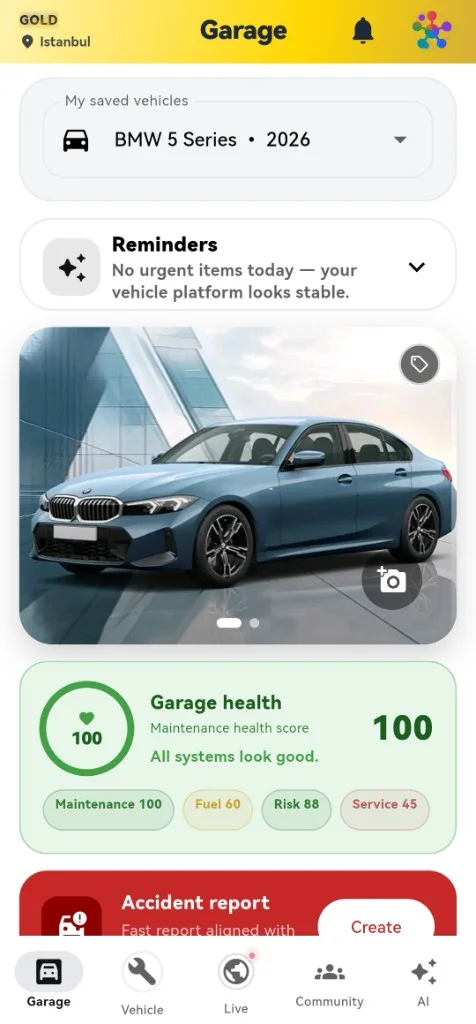
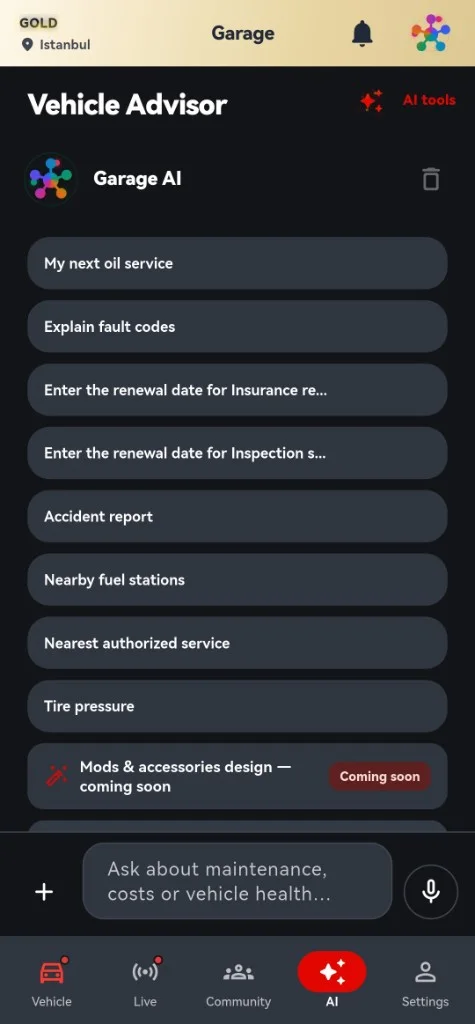
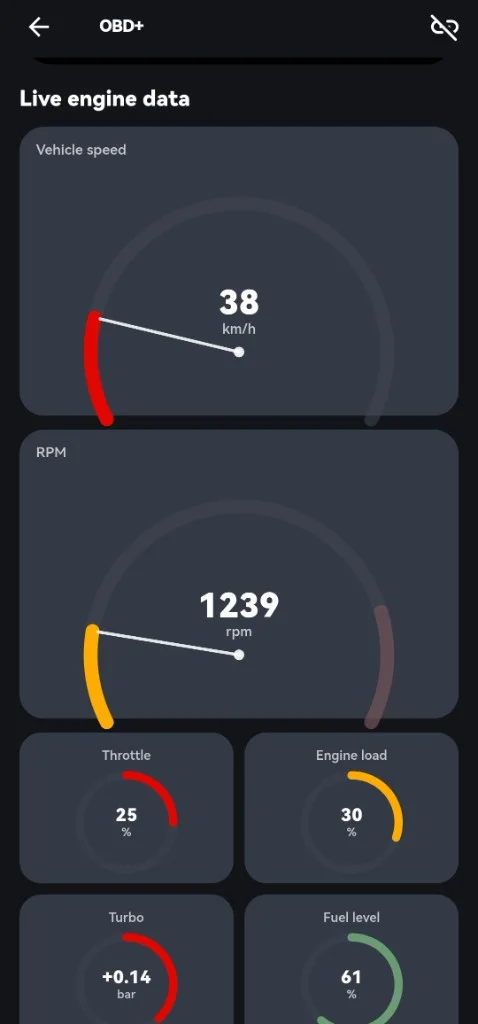
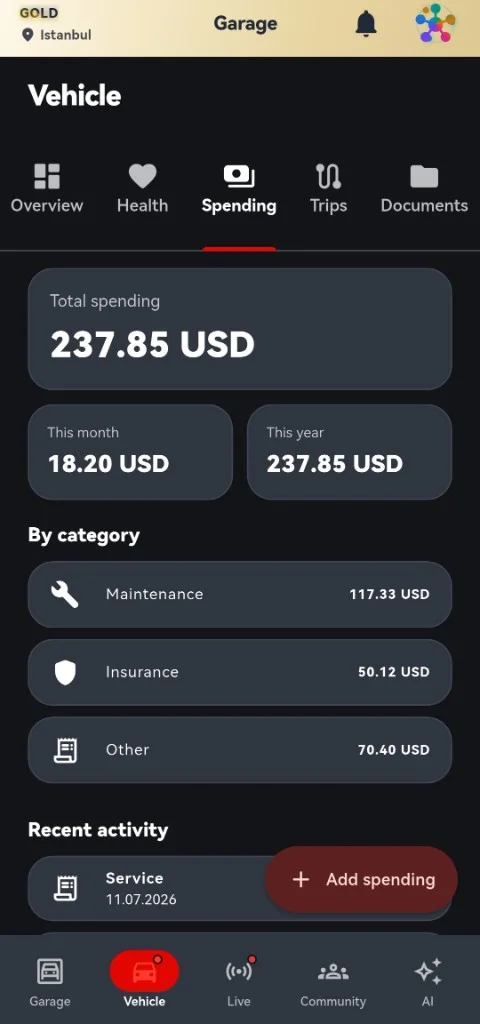
SuperGarage is the shipping consumer reference. Every screen below is a real store screenshot; the overlay shows which parts come from the platform and which the product owns.
SuperGarage capability map
Identifiers imported by supergarage/lib, grouped by owning package.
after_core
- AfterUserPlan
- AfterAiCredentialVault
- AfterLocalNotifications
after_consumer
- FamilyShellHeader
- AfterRegionalLocation
after_firebase
- AfterFirebaseBootstrap
Product features
- features/vehicle
- features/maintenance
- features/obd
- features/expenses
- features/fleet
- features/trips
- features/assistant
- features/community
Product family
Status as recorded in supercore/catalog/products.yaml. Only SuperGarage is marked shipping.

SuperGarage
Consumer · Reference
Mobility: vehicles, maintenance, insurance, fuel, OBD, fleet
ShippingSuperGarage (opens in a new tab)after_core · after_design_system · after_firebase · after_consumer

AfterHub
Consumer · OS shell
Consumer OS shell: identity, dashboard, AI, calendar, search, After+
Scaffoldafter_ai · after_consumer · after_core · after_firebase · after_design_system · after_ecosystem

SuperHospital
Enterprise · Reference
Hospital operations — enterprise reference
Scaffold
SuperHealth
Consumer
Personal health: medications, records, sleep, nutrition
ScaffoldSuperHealth (opens in a new tab)
SuperFinance
Consumer
Personal finance: subscriptions, budgets, investments
Scaffold
SuperHome
Consumer
Property and household: maintenance, utilities, warranties
Scaffold
SuperTravel
Consumer
Travel: trips, flights, hotels, itineraries
Scaffold
SuperPet
Consumer
Pets: veterinary care, food, health records
Scaffold
SuperNews
Consumer
AI-personalized news with summaries
ScaffoldSuperNews (opens in a new tab)
SuperSports
Consumer
Sport and performance: fitness, scores, fixtures
ScaffoldSuperSports (opens in a new tab)
SuperAirport
Enterprise
Airport operations: flights, gates, runways
Scaffold
SuperMaritime
Enterprise
Port and vessel operations
Scaffold
SuperFactory
Enterprise
Factory floor MES and maintenance
Scaffold
SuperFarm
Enterprise
Farm operations: crops, livestock, equipment
Scaffold
06 · Design system
Consistency without sameness.
after_design_system gives every product the same chrome, density and motion. Products change their accent, monogram, features and copy — not the system.
Tokens
Color, spacing, radius and motion are Dart constants, shared by consumer and enterprise.
Color
- accent#38BDF8
- accentDeep#0284C7
- graphite950#0B0C0F
- graphite800#222831
- steel#8A919D
- lightBackground#FAFBFC
- success#22C55E
- warning#F59E0B
- danger#EF4444
Spacing · 4pt scale
- xs4
- sm8
- md12
- lg16
- xxl24
- xxxl32
- massive48
- hero64
Radius
- 6
- 8
- 12
- 16
- 20
Motion
- instant100ms
- fast · micro180ms
- normal · page280ms
- slow · modal420ms
- emphasis560ms
Components
Buttons, cards, inputs, navigation, dialogs, charts, dashboard, empty and loading states, settings sections and the shell top bar.
- buttons.dart
- cards.dart
- inputs.dart
- navigation_bar.dart
- dialogs.dart
- charts.dart
- dashboard.dart
- empty_states.dart
- loading.dart
- settings_section.dart
- shell_top_bar.dart
Accessibility
Light and dark color schemes ship together. Chart series are ordered to stay distinguishable, and motion tokens keep transitions short and purposeful.
Responsive behavior
Page padding and content width adapt to the viewport width through AfterSpacing.
| Viewport width | Content max | Page padding |
|---|---|---|
| < 360 | width | 14 / 10 / 14 / 28 |
| 360 – 419 | 520 | 16 / 12 / 16 / 28 |
| 420 – 719 | 640 | 20 / 12 / 20 / 28 |
| ≥ 720 | 760 | 20 / 12 / 20 / 28 |
Brand extension
Each product spec declares an accent and monogram. The theme takes the accent through accentOverride; everything else stays in the family.
- SuperGarage#22D3EE
- SuperKids#F472B6
- SuperHospital#F43F5E
- SuperFactory#F59E0B
07 · Documentation
Documentation built for scanning.
Every page is derived from the supercore repository and links back to its source file.
- Instant search with keyboard shortcut
- Sticky table of contents with deep links
- Copy buttons and syntax highlighting in both themes
- Package pages with dependency graphs
- Architecture diagrams with static fallbacks
- Available in ten languages, with right-to-left support
08 · Enterprise boundaries
Boundaries that fail closed.
Enterprise isolation is enforced in code and recorded in architecture decision records.
Fail-closed tenancy
Org-scoped enterprise ports require an EnterpriseScope. A missing organizationId throws — they never return all tenants.
Permissions before persistence
Vertical features check PermissionSet.allows(...) before any mutating call. Products declare their own permission strings.
Append-only audit
Every mutating enterprise action must append an AuditLogEntry to the append-only AuditLogRepository.
Secure interop only
Cross-product calls go through AfterSecureInteropBridge: After ID audience, scopes, RBAC and org membership, then a mandatory audit entry.
Fail-fast bootstrap
In production mode a missing adapter throws at startup, so mock providers cannot silently reach production.
Modular by construction
Real backends replace MockEnterpriseRepository at the composition root. The OS layer never learns the vendor's name.
/// Fail-closed tenant + actor context for enterprise ports (ADR-002).
class EnterpriseScope {
  final String organizationId;
  final String actorId;
  final PermissionSet permissions;

  /// Throws if [organizationId] is missing/blank — never allow all-tenant lists.
  static String requireOrganizationId(String? organizationId) {
    final id = organizationId?.trim() ?? '';
    if (id.isEmpty) {
      throw StateError(
        'EnterpriseScope: organizationId is required (fail-closed tenancy).',
      );
    }
    return id;
  }
}
Source supercore/packages/after_enterprise/lib/src/scope/enterprise_scope.dart (opens in a new tab)
These are architectural controls documented in the supercore repository. After Framework makes no claims of certification or regulatory compliance.
Enterprise boundariesMake the product smaller. Make the foundation stronger.
Start with the architecture, read the package docs, or explore the source.